A Practical Guide for Service-Based Businesses
With rising competition, higher costs and tighter margins, how your Google Ads account is set up will determine whether your ads perform well enough to generate leads at a profitable cost.
Getting this right from the start is more important than ever.
So if you want to avoid wasted spend and let Google’s system do the heavy lifting, follow these 5 tips on how to set-up your account.
1. Primary vs Secondary Conversions
Conversion tracking is the most important part of any Google Ads campaign.
Without it, you’re flying blind and won’t know what’s working or where your budget is being wasted.
But just as important as tracking conversions is making sure you’re tracking the right ones.
Not All Conversions Are Equal
In Google Ads, a “conversion” is any action you consider valuable – typically when someone submits a contact form or takes a step in that direction.
Sample Conversion Events:
- Form submissions
- Phone calls
- Quote requests
- Button clicks (Call to Action, Phone Number, Email)
- Page views (e.g. “Contact Us”)
- Time on site
- Scroll depth
- Other engagement signals
The problem I often see is businesses tracking all of these actions as “primary conversions” – essentially treating them as equal, or at least telling Google that they are.
Giving Google more data might seem like a good idea. And while it may seem logical to optimise towards signals of intent, that doesn’t always lead to better results.
For example, users who spend more time on your site might be coming from informational search terms. They’re in research mode, not ready to take action – and if Google starts prioritising that traffic, your campaigns and results will suffer.
So How Do You Track Everything Without Skewing Results?
Use Primary and Secondary conversions:
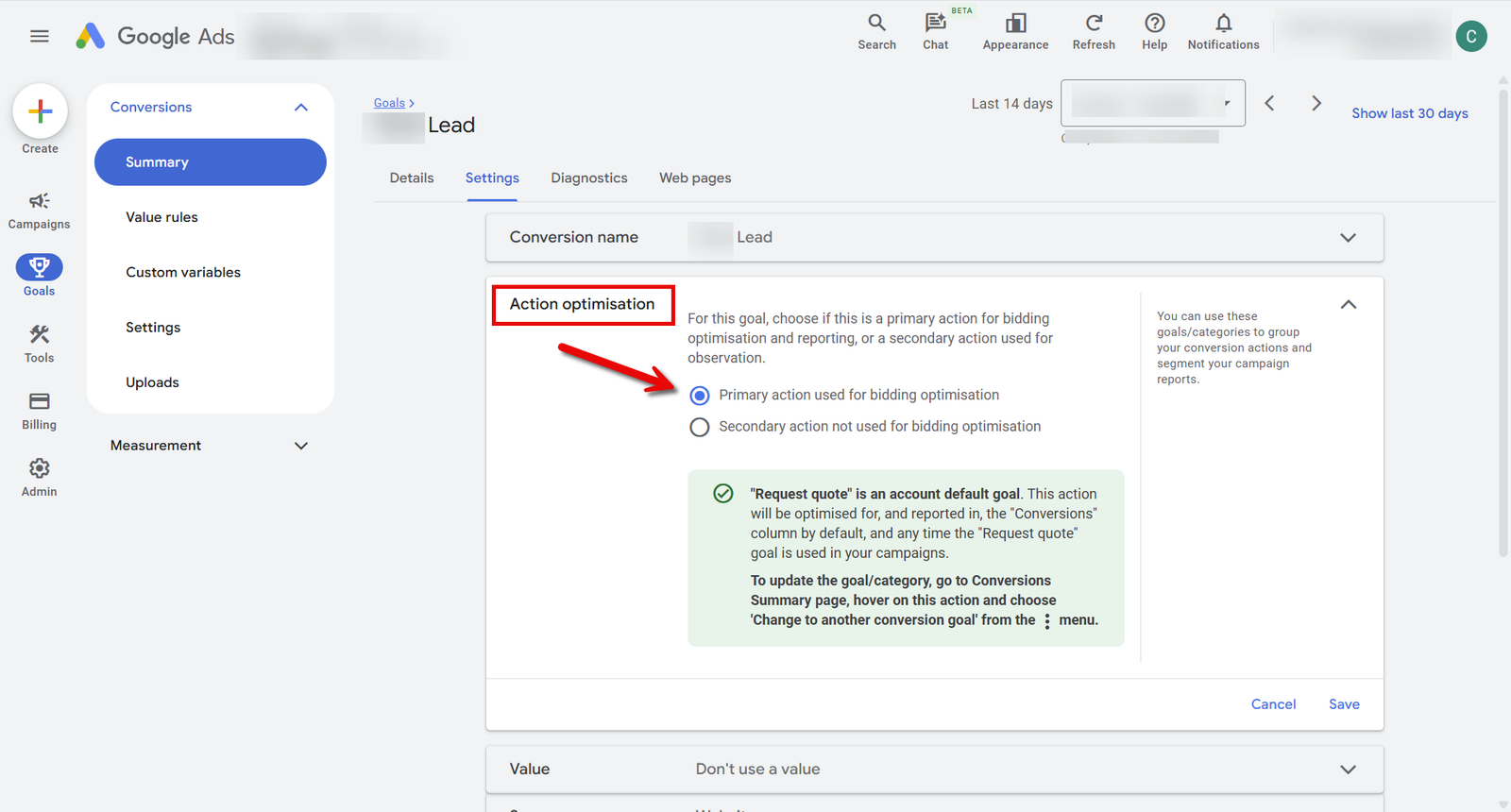
- Primary Conversions are the actions you want to optimise for – like form submissions or calls that last over 60 seconds. These tell Google’s Smart Bidding what matters most.
- Secondary Conversions are useful for reporting and insight – like scroll depth, button clicks, or time on site.
By keeping your primary goal focused on leads, you not only help the algorithm stay on track but it also helps you get clearer reporting on your cost per lead, making it easier to review and optimise your campaigns based on what really matters.
How to Check Your Conversion Settings
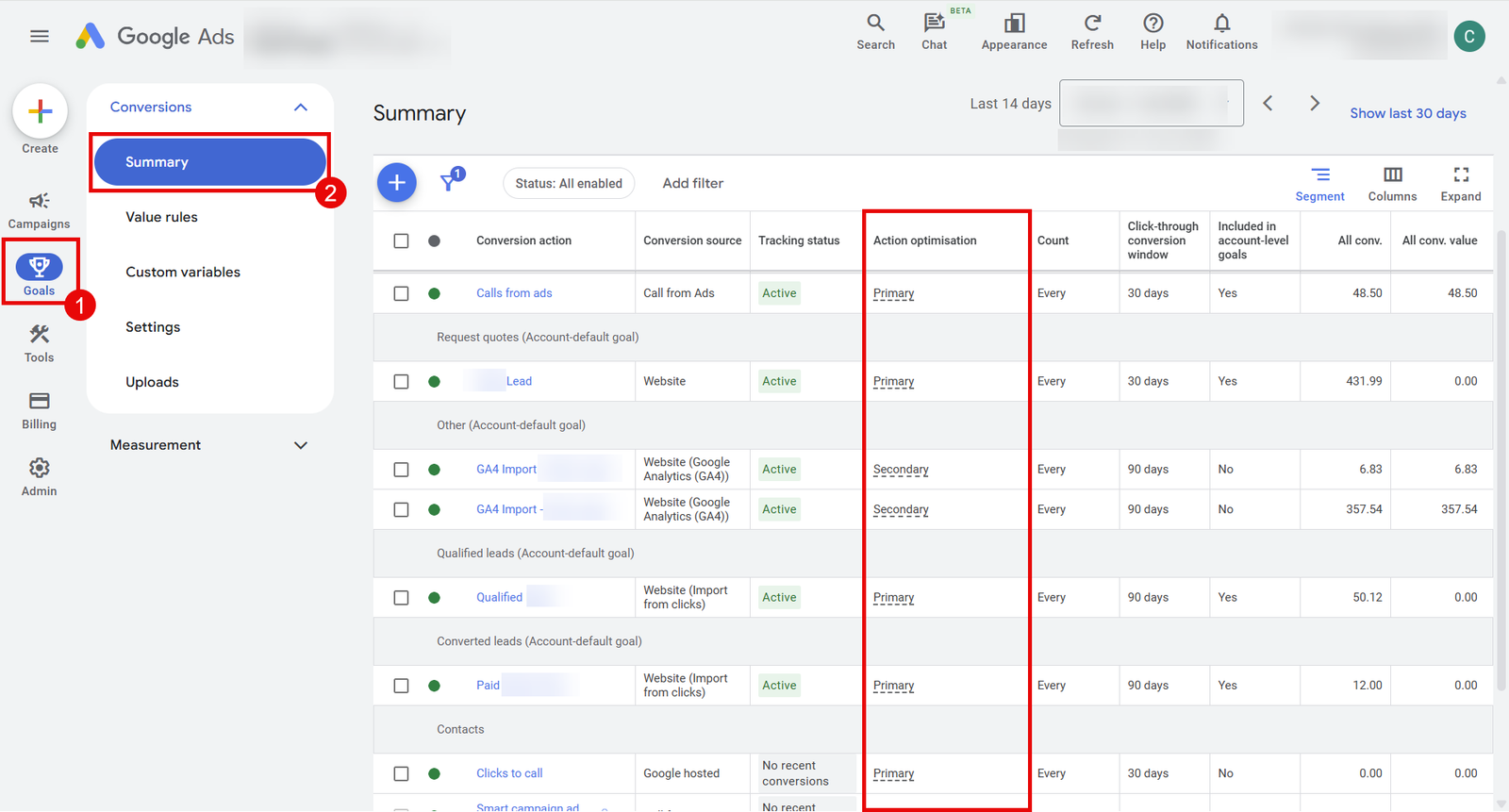
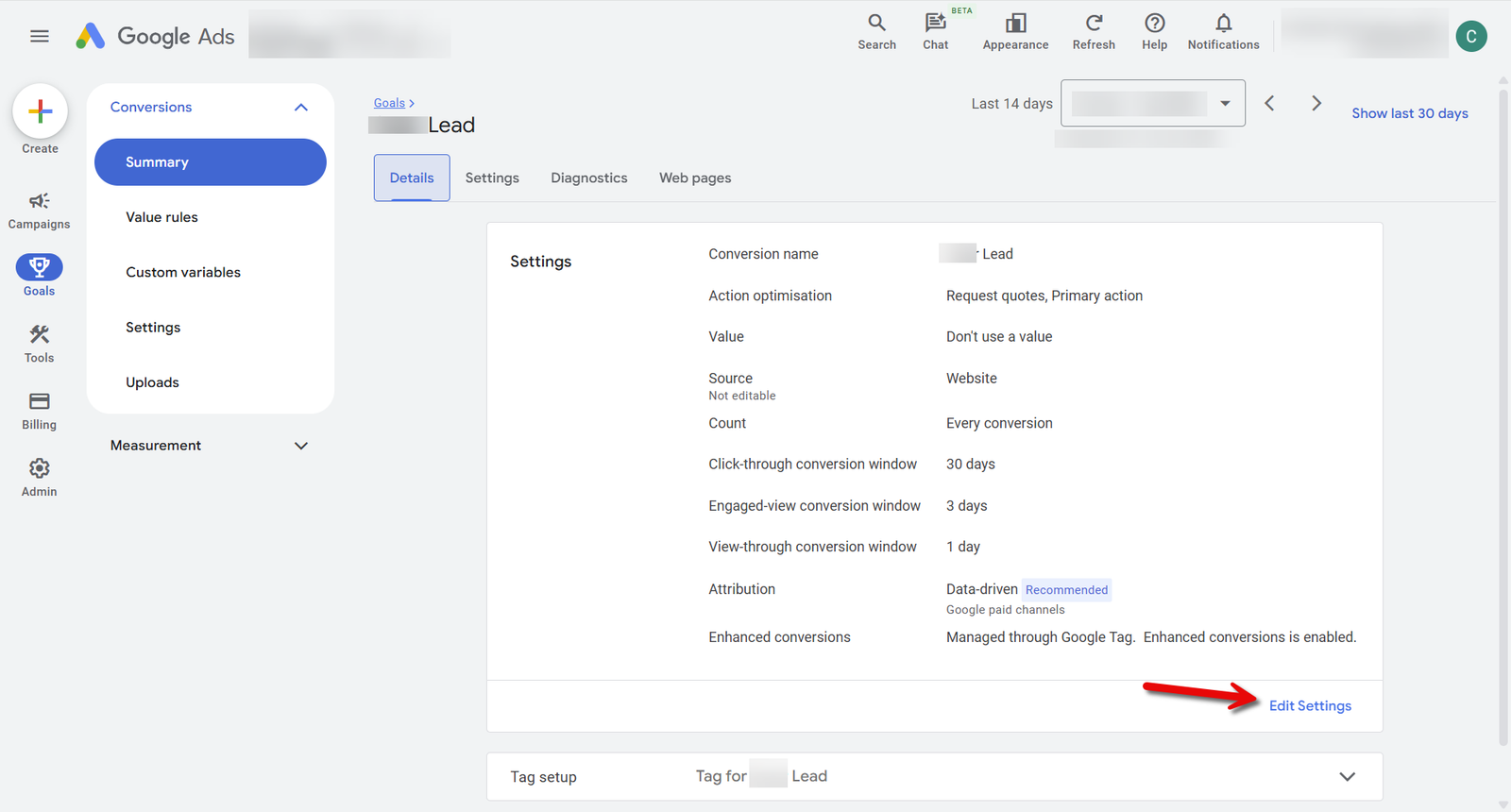
To see which conversions are marked as Primary or Secondary in your account follow steps below:
- In your Google Ads dashboard, go to the left-hand navigation menu.
- Click on “Goals”, then select “Summary” under Conversions.
- In the “Action optimisation” column, you’ll see whether each conversion is marked as Primary or Secondary.
- To change a setting, click into the conversion action, select “Edit settings”, make your changes, and click Save.
2. Choose the Right Bidding Strategy
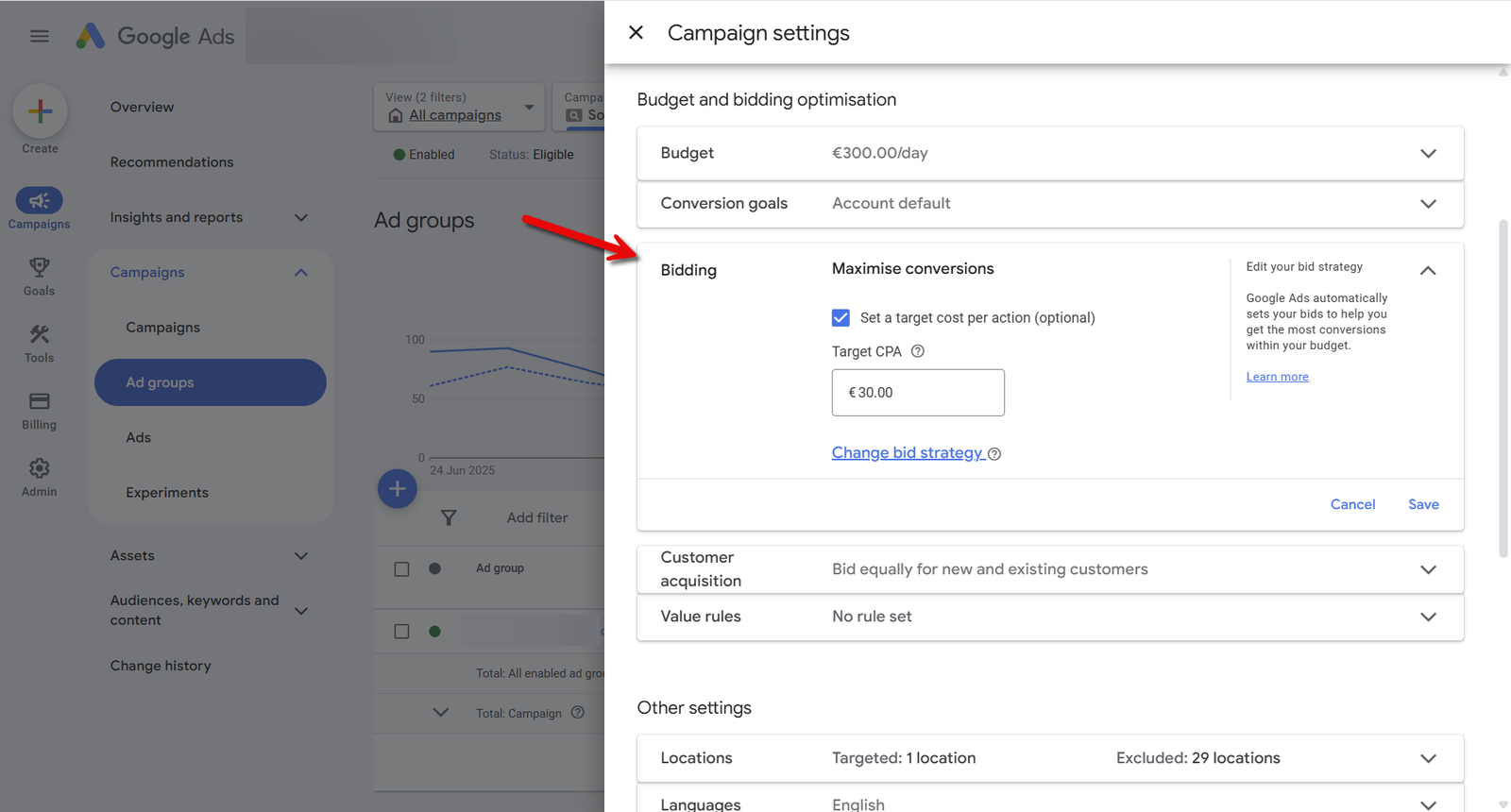
Spoiler, it’s Maximise Conversions with Target CPA
As a service-based business, your primary goal is likely to generate enough leads (based on your internal capacity) at the lowest possible cost.
Forget about how many clicks your ad got or how many people engaged with your website, these are secondary and while they can help guide improvements, never lose sight of what really matters.
Your bidding strategy should reflect your target and focus on Primary Conversions (i.e. Leads), not signals of intent (i.e. button clicks, pageviews, etc.)
Bid Strategy:
- Maximise Conversions with a Target CPA (Cost Per Acquisition) – this tells Google to get you as many leads as possible, at or below your target cost per lead.
What If You Don’t Have Enough Conversions?
If you’re generating fewer than 30 conversions per month (due to budget, seasonality or industry) you may need to break the rules and expand your Primary Conversion definition to include some intent signals (like “form start” or “quote pageviews”) to help Google learn.
Just be careful not to flood the system with weak signals, only include actions that strongly correlate with actual leads.
What Happens if Your Target CPA Is Set Incorrectly?
If your tCPA is too low – Google won’t be able to bid high enough to compete for quality search terms and as a result your ads will likely stop showing due to low auction competitiveness.
If your tCPA is too high – Google may bid too aggressively, you risk overpaying, driving up costs and paying too much for leads.
In short: too low, and your ads won’t compete. Too high, and you risk overpaying.
How to Calculate Your Target CPA (tCPA)
If you’re not sure where to start, you can calculate your tCPA it using your lead-to-sale conversion rate and average profit per sale.
Example:
Let’s take someone in the Boiler Installation Industry.
- 1 in 10 leads becomes a sale
- Average Sale Price: €1,200
- Average Profit per Sale: €600
- Breakeven Cost per Lead: €600 ÷ 10 = €60
If you want to keep at least 50% of the profit, your target cost per lead would be around €30.
This gives you a good starting point, which you can adjust as needed.
Finding the Sweet Spot?
- Raise your tCPA: Google bids more aggressively. Provided there is enough search volume for the terms that drive conversions, this should result in more conversions, but at a higher cost.
- Lower your tCPA: Google bids more conservatively. This can reduce your cost per Conversion, making your ads less prominent resulting in fewer conversions but at a better cost.
Keep in mind that results can fluctuate based on factors like competition, seasonality and search volume, so it’s worth monitoring and adjust based on:
- How much you’re willing to pay for a lead
- Your internal capacity
The goal is simple: Hit your ideal number of leads at the lowest possible cost.
3. Review Your Campaign Structure
Google Ads has changed a lot in recent years. Where we once focused on segmentation to better control CPCs and performance – the rise of smart bidding and machine learning has shifted this approach.
Now, it often makes more sense to consolidate – feeding as much data as possible into a single campaign, ad group or keyword.
Why?
The algorithms perform better with more data. A more consolidated structure gives the system enough volume to learn quickly, optimise bids and deliver more consistent results – especially when budgets are limited.
How Many Campaigns Do You Need?
There’s no one-size-fits-all structure, but in most cases, the main reason to segment campaigns is to control budget more effectively.
While separate campaigns give you the flexibility to prioritise spend where it matters most.
Most common reasons to segment include:
- Location: If you need to manage budget by area due to capacity or coverage, segmentation makes sense.
- Services: Each service will have different costs, search terms, and conversion rates. Keeping them separate gives you clearer performance insights and better control.
- Brand Campaigns: Brand keywords usually convert well at lower costs. Keeping them in a separate campaign ensures they don’t skew the performance data of your non-brand campaigns.
- Competitor Campaigns: If you’re bidding on competitor terms, keep this traffic separate. It behaves differently and typically has a higher cost per lead, so tracking it independently is recommended.
If you have a healthy budget and strong conversion volume, segmenting campaigns can offer better control. But for most businesses, consolidation performs better as fewer campaigns means more data per campaign, which helps Google optimise better.
When to Segment Ad Groups
Segmenting ad groups can improve relevance but don’t do it at the expense of performance,
Here’s when it makes sense:
- Do you need different ad copy or landing page?
If certain keywords require specific headlines, messaging or a different landing page experience, it’s worth creating separate ad groups. But sometimes, keeping things more general can work better especially if one well-written ad and page can effectively serve multiple related terms and simplify your setup.
- What about match types?
Splitting ad groups by match type (e.g. exact vs. broad) is an outdated approach – if you want to test different match types, keep them in the same ad group. As you gather more data insights, you can pause the lower-performing variants to focus spend where it delivers the best results.
How many Keyword Groups or Variations should you have?
Here’s the approach I use:
- Start with an extensive list of keyword variations.
- Group keywords by intent/theme.
- Eliminate very close variations (e.g. same words in a different order, etc.).
- If a theme needs its own ad copy, create a separate ad group.
- Launch the campaign, and within the first 30–60 days, I typically pause around 80% of the keywords, anything generating low traffic gets paused to consolidate volume through broader terms.
In most cases, traffic will naturally funnel into a handful of high-performing keywords. Over time, your campaign should rely on a small number of quality terms generating consistent results.
In short:
Sometimes segmentation makes sense but don’t overdo it. Too many groups can dilute data and increase workload. Aim for the sweet spot between control and performance.
4. Improve Your Ad Copy
Writing effective ad copy isn’t about getting clicks – it’s about getting the right clicks.
Your goal is to attract high-intent visitors, which lowers your costs by filtering out unqualified traffic before they click your ad and land on your site.
It’s hard to cover every best practice in one section, but if I had to narrow it down, here are a few proven principles that address the most common mistakes that if avoided can help improve your ad performance:
- Focus on Quality, Not “Ad Strength”
Don’t place too much importance on Google’s “Ad Strength” score. It places more weight on “variety” rather than relevance.
You are much better having fewer headlines that are clear, specific and written for the right audience, not to please Google’s algorithm. - Pre-Qualify Your Clicks
Good ad copy doesn’t just attract more clicks, it actively discourages the wrong ones.
The best way to do this is with pinned headlines that include a qualifying message (like the specific service, price or location). Avoid vague or overly generalised copy as it often attracts low-quality traffic.
Your headline should be direct and specific. - Value positions & CTAs
For your remaining headlines, test a mix of value propositions and calls to action (CTAs).
I recommend not pinning headlines to positions 2 or 3. I’ve made the mistake of trying to control ad structure by pinning value positions to position 2 and CTAs to position 3, but as Google often only shows two headlines. If you pin something to position 3, there’s a good chance it won’t appear at all.
From our ad combinations reports, CTAs tend to show more often that value positions, which makes sense as they prime users to take action leading to stronger conversion rates. Still, it’s worth testing a healthy mix of both. - Utilise All Relevant Ad Assets (Extensions)
Ad assets are a simple but powerful way to improve the visibility and performance of your ads.
They give your ads more prominence on the search results page and provide extra space to communicate value which will improve your click-through rates and help lower your costs.
Main Ads Assets to include are:
- Sitelinks: Link to key pages like “About Us”, “Pricing,” “FAQs,” or “Get a Quote”
- Callouts: Highlight unique selling points like “Free Consultations” or “Local Installers”
- Structured Snippets: Show specific features (e.g. “Services: Solar Panels, Battery Storage, EV Chargers”)
- Call Extensions: Add a phone number for quick mobile conversions (Tip: don’t forget to include an ad schedule so this only shows during business hours)
- Sitelinks: Link to key pages like “About Us”, “Pricing,” “FAQs,” or “Get a Quote”
5. Invest in Your Landing Pages
Your landing page is one of the most important and often overlooked parts of a successful Google Ads campaign.
You can have the perfect campaign setup, compelling ad copy and highly targeted keywords but if your landing page doesn’t convert enough visitors into interested buyers, your performance will fall short.
If you would like to dive deeper into this topic, I recommend you check-out the following articles:
- Branding that Converts
Before diving into design or content, take a moment to review your brand and how you’re positioned in the market. This has a huge impact on how potential customers perceive your business and can dramatically improve your conversion rates and Google Ads performance.
- A Simple 7 Step Framework to Writing Content That Converts
This guide walks you through a proven 7-step framework designed to turn website visitors into qualified prospects. Learn how to grab attention, build trust and guide users to take action.
- 7 Steps To Building High-Converting Landing Page for Paid Ads
Ready to create a page that converts? This article gives you a step-by-step process to build your landing page from scratch.
Unlike your homepage or general service pages, your landing page should be built specifically for your Google Ad campaigns: focused, distraction-free and designed to guide the user toward a clear action like filling out a form, booking a call, or requesting a quote.
Key Takeaways:
- Track the Right Conversions: Focus on meaningful actions and separate your primary and secondary conversions to avoid confusing Google’s algorithm.
- Choose the Right Bidding Strategy: Maximise Conversions with Target CPA is usually recommended. Set a realistic CPA and adjust over time to find the right balance between cost and volume.
- Review Your Campaign Structure: Consolidate campaigns where possible and only segment when it serves a clear purpose.
- Improve Your Ad Copy: Attract high-intent clicks and reduce wasted spend by writing clear, specific and qualifying ad copy. Focus on quality not Ad Strength scores.
- Invest in Your Landing Pages A strong landing page is essential. Stand out with clear branding, avoid common mistakes and build a dedicated page written & designed to convert.
Follow these steps and your Google Search campaigns will spend less, convert better and deliver more consistent results.